Best WooCommerce hosting 2026, ranked on store limits and 3-year cost
WooCommerce runs on your host, so the host decides how checkout copes with a rush and what you pay after year one. These are the plans worth a store's money, with every price dated and every renewal shown.
The best WooCommerce hosting for most stores in 2026 is Liquid Web's Managed WooCommerce, the plans built on the Nexcess platform: $9 a month for the Essentials tier at 50,000 monthly visitors, with staging, daily backups and a PCI DSS-compliant hosting environment, and no renewal step shown on the plan card. SiteGround is the cheapest good start at $2.99 a month, but it renews at $17.99. Cloudways and Kinsta are the step up for growing stores. Every price on this page was read on the vendor's own site on 9 Oct 2026 and is shown with its renewal and term.
We rank on what a store actually runs into: whether the host publishes visit and worker limits, how it handles uncached cart and checkout traffic, and what the plan costs over three years once the intro price is gone. WooCommerce itself is free; you are paying for the server it runs on. For the wider field, including Magento and other carts, see our best ecommerce hosting ranking.
Quick picks by store size
- New store, tight budget: SiteGround WooCommerce GrowBig, $4.99 a month prepaid for a year, renewing at $29.99. Staging starts on this tier.
- Most small and mid stores: Liquid Web Managed WooCommerce Essentials, $9 a month for 50,000 visitors, or Pro at $19 for virtual patching and 14-day backups.
- Stores with sale-day spikes: Liquid Web Elite at $29, the only tier here that auto-scales PHP workers, up to 40.
- Agencies or several stores on one bill: Cloudways, from $28 a month for a 2 GB DigitalOcean server with unlimited sites.
- Premium managed WordPress: Kinsta Single 65k at $50 a month, the first single-site plan Kinsta marks as suited to ecommerce.
- Beginners who want commerce extras bundled: Bluehost eCommerce Essentials, $14.99 a month with three years prepaid, then $21.99.
If you only remember one rule from this page, make it this one: compare WooCommerce hosting plans on their price in year two and on the capacity they publish, never on the first-month sticker. The sections below explain why, then take each host in turn.
What WooCommerce actually needs from a host
WooCommerce's own server recommendations, for version 10.8 and later, are WordPress 6.9 or newer, PHP 8.3 or newer (tested up to 8.4), MySQL 8.0 or MariaDB 10.6 or newer, HTTPS, and a WordPress memory limit of at least 256 MB. Every host on this page meets those floors. They are the minimum for the software to run, not a measure of how a store behaves with twenty shoppers checking out at once. Our WooCommerce hosting requirements guide walks through checking them on any plan.
The limit that matters for a store is concurrency. WooCommerce's caching guidance says the cart, checkout and my-account pages must be excluded from page caching, because they show information specific to one shopper. A product page can be served from cache to everyone; a checkout cannot. So every checkout request runs PHP and queries the database, and the number of those that can run at the same time is set by the host's PHP workers, which Kinsta's documentation describes as how many simultaneous uncached requests a site can handle.
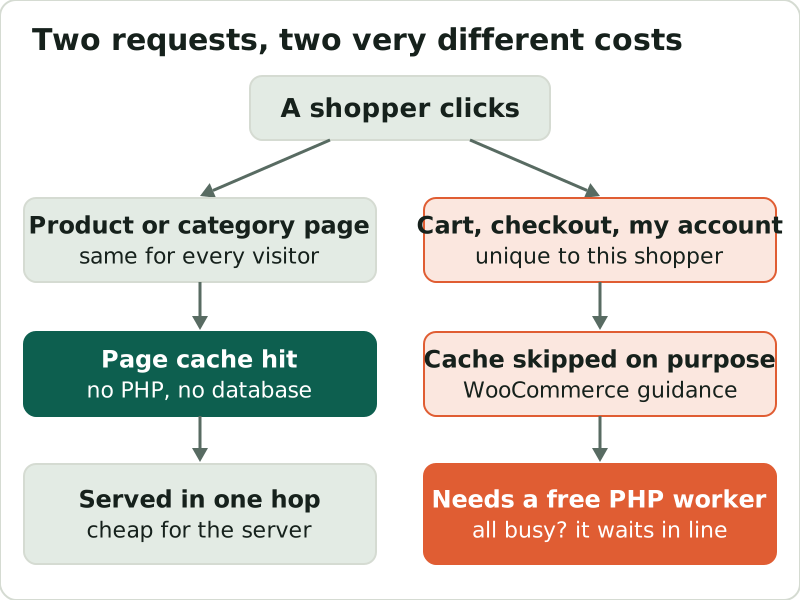
This is why a cheap plan can feel fast in testing and then stall on a sale day. Browsing traffic is mostly cached; buying traffic is not. Few hosts publish worker counts for current plans, so in the rankings below we note what each host does publish: visit allowances, concurrent-visitor caps, CPU limits or auto-scaling. If a host publishes nothing, ask before you buy.
Liquid Web Managed WooCommerce: the default pick
Liquid Web and Nexcess are now one company, with Nexcess Corp. as the parent and Liquid Web selling the Nexcess-built Managed WooCommerce plans. On 9 Oct 2026, the single-site tiers at 50,000 monthly visitors were Essentials at $9 a month, Pro at $19 and Elite at $29, each with 15 GB of storage and 2 TB of bandwidth, billed monthly with 10% off for paying yearly. Larger visit tiers of 150,000 and 400,000 exist; their price fields were blank when we read the page. No intro-versus-renewal split appears on the cards; confirm the term at checkout.
The differences between tiers are store-relevant. Essentials keeps 7 days of daily backups and has staging; Pro keeps 14 days and adds Patchstack virtual patching and a human-run migration; Elite keeps 30 days and is the only tier with auto-scaling PHP workers, up to 40, with the first 24 hours each month included. Liquid Web states its hosting environment is PCI DSS compliant, with the Attestation of Compliance available on request, and says plainly that your store's own PCI compliance remains your responsibility. For most stores this is the least-risk place to start: see Liquid Web's WooCommerce plans.
Affiliate link, marked sponsored/nofollow. We may earn a commission at no cost to you — it never changes a score or a ranking, and we always point you to the renewal price.
SiteGround: best first store, steepest renewal step
SiteGround's WooCommerce plans are the cheapest credible start and come with a well-run stack: StartUp at $2.99 a month (one site, 10 GB), GrowBig at $4.99 (unlimited sites, 50 GB) and GoGeek at $7.99 (100 GB), each prepaid for 12 months with a 30-day money-back guarantee. Daily backups are kept for 30 days on every plan, and staging starts at GrowBig.
The catch is the renewal: $17.99, $29.99 and $44.99 a month, which is six times the intro price on StartUp and more than five times on GoGeek. SiteGround also caps CPU time per plan in its fair-use rules: 2,000 CPU seconds an hour on GrowBig and 4,000 on GoGeek, so a store that grows will hit the plan before it hits the unmetered traffic promise. Use it for a first store, put the renewal in the budget from the start, and plan to move up when orders are steady.
Affiliate link, marked sponsored/nofollow. We may earn a commission at no cost to you — it never changes a score or a ranking, and we always point you to the renewal price.
Cloudways: when you want to size your own server
Cloudways runs a managed server on the cloud provider you choose and lets you put as many stores on it as it can carry. Cloudways advertises plans from $11 a month; on DigitalOcean, the server cards show $14 for 1 GB, $28 for 2 GB and $54 for 4 GB a month, billed hourly, with 1 to 4 TB of transfer. Servers of 4 GB or more get Object Cache Pro free, which helps a store's database-heavy pages.
Cloudways does not publish PHP-worker counts for these servers, so capacity is a matter of sizing: start at 2 GB for a single store and resize when checkout slows. Email is an add-on at $1.50 per mailbox, and bandwidth past the allowance is $0.02 per GB on DigitalOcean. For a single high-traffic store, its Autonomous plans start at $99 a month and list 100 PHP workers per server with automatic scaling. A 3-day trial needs no card.
Affiliate link, marked sponsored/nofollow. We may earn a commission at no cost to you — it never changes a score or a ranking, and we always point you to the renewal price.
Kinsta: premium managed WordPress for stores
Kinsta's single-site WordPress plans are priced on visits or bandwidth, and its own grid answers the store question for you: its $35 Single plans are marked as not recommended for ecommerce or membership sites, while the next tier, Single 65k, is. That plan is $50 a month, or $42 a month billed annually, for one site, 65,000 visits, 10 GB of storage and 250 GB of CDN bandwidth. Backups run daily and are retained for 14 days. Kinsta's prices carry no renewal step, and first-time customers get a 30-day money-back guarantee.
Watch two things. Overage is billed at $0.50 per 1,000 extra visits, so a viral month costs more rather than going offline. And Kinsta does not publish PHP-thread counts for its current plans, only for legacy ones, so ask what your plan allocates before a big launch. Redis is an add-on at $100 a month per site.
Affiliate link, marked sponsored/nofollow. We may earn a commission at no cost to you — it never changes a score or a ranking, and we always point you to the renewal price.
Bluehost: the beginner bundle
Bluehost's WooCommerce plans bundle store tools with hosting. eCommerce Essentials costs $14.99 a month when you prepay 36 months, then renews at $21.99; eCommerce Premium is $21.99 and renews at $30.99. The plans include daily backups, one-click staging, free SSL and a first-year domain at no charge; the Essentials plan card lists 100 websites and 100 GB of NVMe storage. Bluehost's refund window is 30 days.
The value depends on whether you would otherwise buy those commerce extensions. The trade-off is the term: the intro price needs three years paid up front, and Bluehost publishes no worker counts, only an “ideal for 400K visits a month” guide on Essentials. It suits a first-time store owner who wants everything in one cart.
Affiliate link, marked sponsored/nofollow. We may earn a commission at no cost to you — it never changes a score or a ranking, and we always point you to the renewal price.
Hosting.com (formerly A2 Hosting): published limits, unreadable prices
A2 Hosting now trades as Hosting.com, with shared plans called Starter, Pro and Max. It deserves a mention because it publishes the store-relevant limit most hosts hide: 30 concurrent visitors on Starter, 60 on Pro and 120 on Max, alongside 2 to 8 GB of memory and 50,000 to 500,000 monthly page views. Pro is the lowest tier with staging. Its money-back guarantee is 30 days, for the first term only.
We cannot rank it higher because its prices render client-side and did not appear in either of our reads, so we have no verified intro or renewal figure to show you. Check the renewal price before buying.
Affiliate link, marked sponsored/nofollow. We may earn a commission at no cost to you — it never changes a score or a ranking, and we always point you to the renewal price.
3-year cost per pick
Here is what each plan costs over 36 months at today's list prices, with the intro period and the renewal years shown separately. Plans billed monthly assume the rate does not change; SiteGround's years two and three are at its published renewal; Bluehost's 36 months are a single prepaid term; Kinsta is at its $42-a-month annual rate.
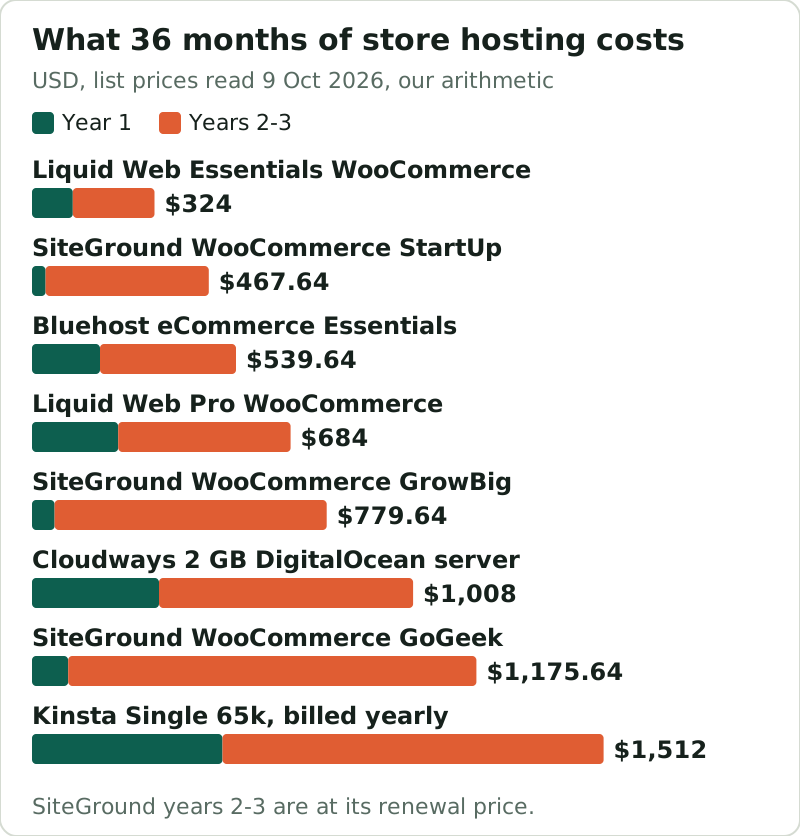
The chart flips the sticker-price order. SiteGround GoGeek looks cheaper than Liquid Web Pro in month one ($7.99 against $19) and costs $491.64 more over three years. StartUp stays second-cheapest over three years, but that buys one site, 10 GB and no staging. The managed plans with no renewal step are the easiest to budget, which is a quieter advantage than any benchmark.
Published limits table
| Host and plan | Price | Published store capacity | Workers or concurrency | Backups |
|---|---|---|---|---|
| Liquid Web Essentials WooCommerce | $9/mo, monthly | 1 site, 50k visitors, 15 GB, 2 TB | Not published | Daily, 7 days |
| Liquid Web Elite WooCommerce | $29/mo, monthly | 1 site, 50k visitors, 15 GB, 2 TB | Auto-scales up to 40 | Daily, 30 days |
| SiteGround GrowBig | $4.99/mo for 12 mo, renews $29.99 | Unlimited sites, 50 GB | 2,000 CPU s/hour cap | Daily, 30 days |
| SiteGround GoGeek | $7.99/mo for 12 mo, renews $44.99 | Unlimited sites, 100 GB | 4,000 CPU s/hour cap | Daily, 30 days |
| Bluehost eCommerce Essentials | $14.99/mo for 36 mo, renews $21.99 | 100 sites, 100 GB, “ideal” 400K visits/mo | Not published | Daily |
| Kinsta Single 65k | $50/mo, or $42/mo billed yearly | 1 site, 65k visits, 10 GB | Not published (current plans) | Daily, 14 days |
| Cloudways 2 GB (DigitalOcean) | $28/mo, billed hourly | Unlimited sites, 50 GB, 2 TB | Not published (Flexible) | Paid offsite storage |
| Hosting.com Pro | Not readable | 10 sites, 150k page views, 50 GB | 60 concurrent visitors | Daily, 30 days |
Read the workers column as the gap in the market. Of the plans in this table, only Liquid Web Elite, Hosting.com and SiteGround publish anything about simultaneous load, and SiteGround's figure is a CPU-time cap rather than a worker count; Cloudways publishes a worker count only for its Autonomous plans, covered above. For everyone else, the honest move is to ask support how many uncached requests your plan handles at once, and to test checkout under load on a staging copy before a promotion.
Shared vs managed vs cloud for a store
Shared plans such as SiteGround's are the cheapest way in and fine for a store taking a handful of orders a day, but you share CPU with other accounts and the renewal step is large. Managed WooCommerce plans such as Liquid Web's and Kinsta's cost more in year one, hold their price, and take updates, backups and caching off your hands; they are the default for a store that is a real revenue source. Managed cloud such as Cloudways sits between: a server sized to you, many stores per bill, billed hourly. Our explainer on managed WooCommerce hosting covers what the managed layer includes, and scaling store hosting for sales spikes covers the day your traffic triples.
Edge cases
- Multi-store owners: Cloudways or SiteGround GrowBig and up host unlimited sites; Liquid Web's and Kinsta's tiers above are per site.
- Heavy catalogues: storage runs out before traffic on the 10 GB and 15 GB tiers, so check product-image volume.
- Card data on your server: a host's PCI environment does not make your checkout compliant; see our PCI compliance guide.
- Prepaid terms: SiteGround and Bluehost intro prices need 12 or 36 months up front, so the refund window matters.
None of these changes the overall ranking for a typical single store, but each one can make the second or third pick the right first choice for a particular business.