PCI Compliant Hosting (2026): What Your Host Covers and What You Own
No host can make your store PCI compliant. PCI compliant hosting means the host runs its own part of the stack to the PCI Data Security Standard and can prove it, usually with an Attestation of Compliance; whether your store is compliant depends on how your checkout handles card data and on the self-assessment you file each year. Pick a payment integration that keeps card data off your server and most small stores land on SAQ A, the shortest questionnaire, almost regardless of host. This guide maps each integration to its questionnaire, splits the work between host and merchant, and lists what each major store host says about PCI as of 9 Oct 2026.
It is written for owners of self-hosted stores on WooCommerce, Magento, Drupal Commerce or similar. It is not legal or compliance advice: your acquirer or payment provider decides which questionnaire you file, and a Qualified Security Assessor (QSA) is the person to ask about anything unusual.
Does your host make you PCI compliant? No: here is the split
PCI DSS applies to anyone who stores, processes or transmits cardholder data, and the merchant is the one who attests. Payment providers say so directly: Stripe, which is certified every year by an independent QSA as a PCI Level 1 Service Provider, still tells its users they must accept payments in a PCI-compliant way and attest to that annually. Liquid Web, which calls its hosting PCI DSS compliant, puts the same point on its WooCommerce page: your store's own PCI compliance remains your responsibility.
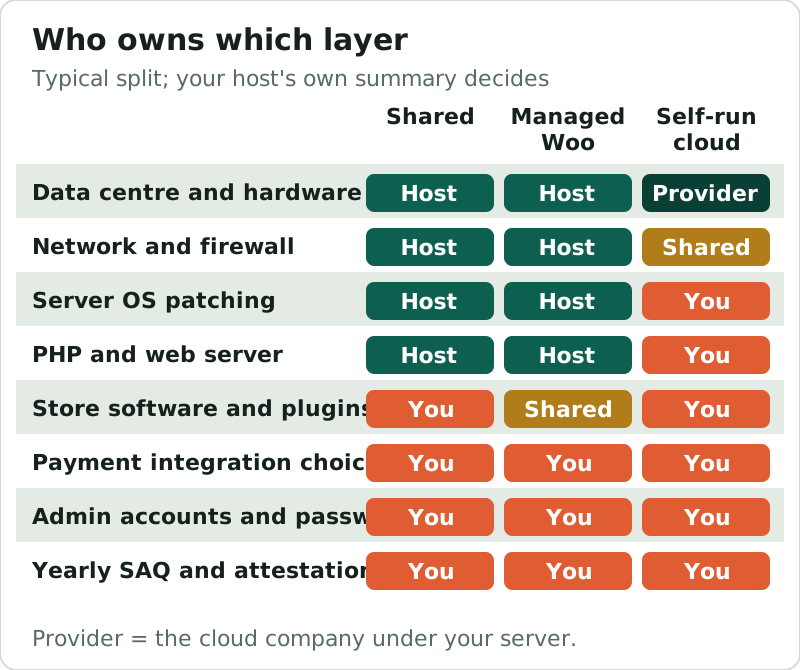
What a good host contributes is a compliant environment for the layers it runs, documented so you can rely on it. That documentation is the Attestation of Compliance (AOC), a summary of the assessor's Report on Compliance. A host's AOC lets you point to its controls for the data centre, network and, on managed plans, the server; it says nothing about your plugins, your passwords or your checkout code.
Which SAQ applies: hosted checkout (A) vs embedded (A-EP) vs self-processed (D)
Most merchants who are not processing large volumes validate with a Self-Assessment Questionnaire (SAQ), and the one you file follows from how card data moves, not from where your site is hosted. Paraphrasing the PCI Security Standards Council's categories: SAQ A is for merchants who fully outsource every card-data function to PCI-compliant third parties, typically a redirect to a hosted payment page or payment fields in an iframe served by the provider. SAQ A-EP is for merchants whose own website controls how card data is sent to the provider, such as a direct-post form or JavaScript the merchant serves. SAQ D covers everyone else, including any setup where card data passes through your own server.
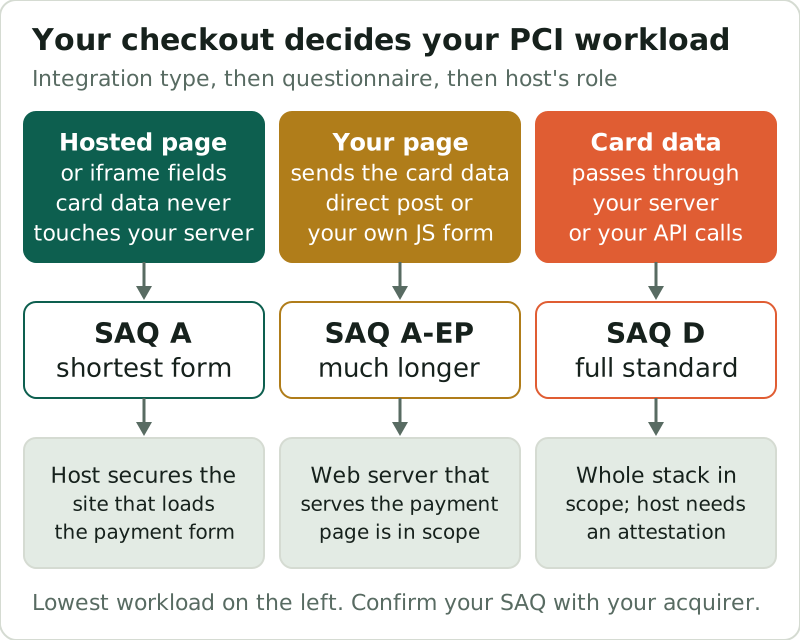
Stripe publishes a useful worked example of that mapping. Its guide puts Stripe Checkout and Stripe Elements, which host the card inputs in an iframe on Stripe's domain, under SAQ A; its legacy Stripe.js v2 under SAQ A-EP; and sending card numbers directly to its API under SAQ D. Stripe also notes that handling raw card numbers yourself can mean more than 300 security controls, which is the clearest argument for the SAQ A route.
The 2025 SAQ A change, in plain terms
In January 2025 the PCI Security Standards Council published a revised SAQ A that took effect on 31 March 2025. It removed requirements 6.4.3 and 11.6.1, both about scripts on payment pages, plus the supporting 12.3.1, and added an eligibility criterion in their place: the merchant confirms its site is not susceptible to attacks from scripts that could affect its e-commerce systems. In practice, an SAQ A store still has to think about scripts on the page that loads the payment form; the questions just moved from the requirements into the eligibility check.
The wider timeline is settled. PCI DSS v3.2.1 retired on 31 March 2024. Version 4.0.1, a limited revision of 4.0, was published in June 2024 and replaced 4.0 when that retired on 31 December 2024. The requirements v4 had marked as future-dated became effective on 31 March 2025. Anyone still quoting v3.2.1 controls or treating the v4 additions as optional is out of date.
What stays your responsibility as the merchant
Whatever your host provides, four things stay with you. The payment integration you choose, which sets your SAQ. The software you run on top of the server: WooCommerce, the theme and every plugin, including anything that adds scripts to the checkout. Access control: who has admin accounts, how strong their passwords are, and whether they use two-factor sign-in. And the paperwork: completing the right SAQ each year and keeping your host's and payment provider's attestations on file.
On a self-managed cloud server, add the operating system, web server and PHP version to that list, because no one else is patching them. That is the main compliance difference between shared or managed hosting and running your own server, and it is why an SAQ D store on a self-run server carries the heaviest load in this guide.
A host can hand you an attestation for its layers. Only you can sign the questionnaire for your store.
Hosts that publish PCI attestations
We checked each major store host's WooCommerce or plan page on 9 Oct 2026, reading from the US, and noted what it says about PCI. A missing statement does not mean a host is non-compliant; it means the page gives you nothing to rely on, so you would need to ask support for an AOC or responsibility summary in writing.
| Host | PCI statement found | Attestation | What to ask for |
|---|---|---|---|
| Liquid Web / Nexcess | PCI DSS Level 1 service provider across its open-source hosting | AOC on its Security & Trust page; on request for WooCommerce plans | The current AOC and the responsibility matrix |
| SiteGround | None on the WooCommerce hosting page | Not stated | Whether an AOC exists for shared plans |
| Cloudways | None on the WooCommerce hosting page | Not stated | Which provider's attestation covers your server |
| Bluehost | None on the WooCommerce hosting page | Not stated | An AOC or written responsibility summary |
| Kinsta | None on the pricing or security pages we read | Not stated | An AOC for the plan you are buying |
Liquid Web goes furthest. It describes itself as a PCI DSS Level 1 provider across its hosting for open-source applications, says it is listed on Visa's Global Registry of service providers, and publishes its AOC. For stores that end up in SAQ D, it also sells PCI dedicated-server bundles that include PCI scans of up to 10 IPs inside the Liquid Web environment, listed at $354, $391 and $615 a month with a 17%-off promotion shown; plain dedicated servers start at $249. If you want the attestation in hand before you migrate, Liquid Web's WooCommerce plans are the simplest route.
For a store that stays in SAQ A, the host's attestation matters less than it sounds, because your server never sees a card number. It still matters that the host keeps the site patched and served over TLS, since Stripe requires TLS 1.2 or newer on payment pages, and that the page loading the payment form cannot be tampered with.
What to actually ask a host
Before you move a store, send the host's sales or support team four questions and keep the answers. Will you provide your current Attestation of Compliance, and which services and data centres does it cover? Do you have a written responsibility matrix showing which PCI requirements you meet for my plan and which stay with me? Which PHP and TLS versions do you run, and how quickly do you apply security patches? And for a managed plan, who patches WordPress and plugins, and can I hold updates back while I test them on staging?
A host that answers all four in writing is easy to document in your SAQ. A host that answers with a badge on its homepage has told you nothing you can file. Neither answer changes the questionnaire your checkout puts you in, which is why the integration choice still comes first.
WooCommerce-specific PCI checklist
For a WooCommerce store, the checklist below keeps most small merchants in the lightest questionnaire. It is ordered by impact, so the first item does more than the rest combined.
- Use a gateway's hosted checkout or iframe payment fields, so card numbers never reach WordPress.
- Keep WooCommerce, WordPress, the theme and plugins updated, and run PHP 8.3 or newer as WooCommerce recommends.
- Serve the whole store over HTTPS with TLS 1.2 or newer.
- Give every admin a unique account with two-factor sign-in, and remove accounts that are no longer used.
- Keep scripts on the checkout page to the ones you need, and review them when you add a plugin.
- Ask your host for its AOC or responsibility summary, and file it with your gateway's attestation.
- Complete the SAQ your acquirer or gateway tells you to, every year.
None of these needs a specialist host. They need a decent one and an owner who treats the checkout page as the most sensitive page on the site. If you are choosing a host at the same time, our best WooCommerce hosting ranking notes which plans publish limits and attestations, and SSL and security for online stores covers the security layer around the checkout.
Edge cases
- Drupal, Magento and other carts: the same rules apply; the SAQ follows the integration, not the CMS. Hosts that suit those carts are compared in our ecommerce hosting ranking.
- Phone or manual orders typed into a dashboard: Stripe maps that to SAQ C-VT, a different form again.
- In-person card readers alongside the web store: Stripe maps Terminal to SAQ C, so you may file more than one.
- Custom checkout code that posts card data to your server: that is SAQ D, whatever the host advertises.
If any of these describes your store, settle the questionnaire with your acquirer before choosing hosting, because it decides how much of the server you will have to document.
PCI compliant hosting, answered
What is PCI compliant hosting?
Do I need PCI compliant hosting for WooCommerce?
Which hosts are PCI DSS compliant?
Is PCI DSS 4.0.1 mandatory?
What changed in SAQ A in 2025?
Fit this to the field: the best ecommerce hosting, ranked, or hosting picked specifically for WooCommerce.